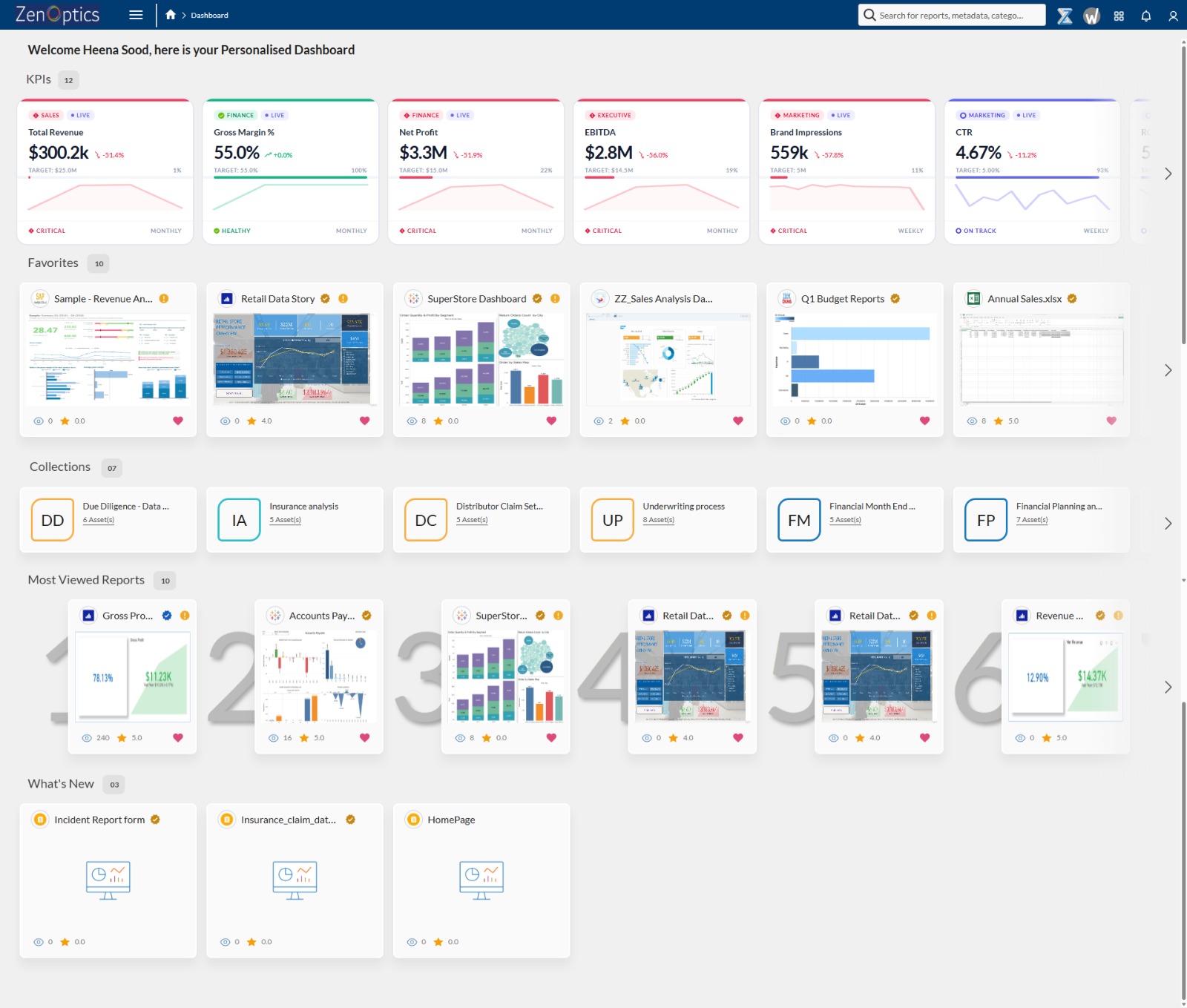


BI migrations often fail not because of the technology, but because organizations don’t fully understand what they are migrating. Enterprises move reports and dashboards across platforms like Tableau, Power BI, SAP Analytics Cloud, Qlik, and MicroStrategy without assessing what is actually used, what is duplicated, and what drives business decisions. As a result, they end up recreating the same inefficiencies in a new environment.
A BI environment audit is not just an inventory exercise. It is a critical step in establishing analytics governance and building a context layer that enables consistent, AI-ready decision-making. Without this foundation, migration becomes a lift-and-shift of existing problems. With it, organizations can eliminate redundant reports, standardize KPI definitions, and improve trust in analytics across teams.
Why BI Environment Audits Matter
Most enterprise analytics environments evolve over time, often without centralized governance. Reports are created across Tableau, Power BI, SAP Analytics Cloud, Qlik, and MicroStrategy, while business users rely heavily on spreadsheets and ad hoc reports for decision-making. Over time, this leads to fragmentation, duplication, and inconsistent metric definitions.
Before migrating or consolidating BI tools, organizations need a clear understanding of their analytics landscape. This includes visibility into reports, dashboards, KPIs, ownership structures, and usage patterns. Without this visibility, migration efforts risk amplifying existing issues instead of resolving them.
An effective audit ensures that organizations are not just moving data and dashboards, but improving how analytics is structured, governed, and used.
The 5-Step BI Audit Framework
Step 1: Inventory All Analytics Assets Across BI Tools
The first step in a BI audit is to inventory all analytics assets across platforms such as Tableau, Power BI, SAP Analytics Cloud, Qlik, MicroStrategy, and spreadsheet-based reporting systems. This includes dashboards, reports, KPIs, and ad hoc analyses. Capturing metadata such as ownership, creation date, and usage patterns is essential because organizations cannot optimize what they cannot see.
Step 2: Establish Ownership and Data Lineage
The next step is documenting ownership and data lineage. Every report and KPI must have a clearly defined owner and a traceable link to its underlying data sources. This ensures accountability and helps prevent errors during migration. It also reveals hidden dependencies and conflicting definitions that often exist across different teams.
Step 3: Analyze Usage and Business Value
Once ownership and lineage are established, organizations must analyze usage and business value. Not all reports are equally important. Some are critical for decision-making, while others are rarely accessed. By evaluating usage frequency, number of users, and business impact, teams can prioritize which assets to retain, consolidate, or retire. In many cases, a large percentage of reports across tools like Power BI and Tableau are either unused or redundant.
Step 4: Identify Duplication and KPI Inconsistencies
The fourth step involves identifying duplication and KPI inconsistencies. It is common to find multiple reports representing the same metric, such as revenue or margin, calculated differently across departments. This leads to confusion and reduces trust in analytics. A BI audit provides an opportunity to standardize definitions and eliminate conflicting reports.
Step 5: Build a BI Migration and Rationalization Roadmap
Finally, organizations must build a migration roadmap. This roadmap should clearly define which assets to migrate, which to consolidate, and which to eliminate. Prioritization should be based on business value, technical complexity, and dependencies across systems. This ensures that migration aligns with business outcomes rather than being treated as a purely technical exercise.
Common BI Audit Challenges
Many organizations underestimate the scale of their analytics environment. It is common to discover significantly more reports and dashboards than expected, especially when including spreadsheets and ad hoc reports created outside formal BI tools. Another challenge is the lack of ownership, where no single individual is responsible for maintaining or validating a report.
Additionally, organizations often treat all reports equally during migration, leading to unnecessary complexity in the new system. Without proper analysis, low-value or duplicate reports are carried forward, increasing maintenance costs and reducing usability. A successful audit requires not just cataloging assets, but understanding their relevance and impact.
Why BI Audits Fail Without Context
Most BI audits focus on cataloging assets—what reports exist, where they are stored, and who owns them. However, they fail to address a more critical question: what those reports actually mean.
Reports and dashboards across Tableau, Power BI, SAP Analytics Cloud, Qlik, and MicroStrategy already contain semantic context in the form of KPI definitions, relationships, and business rules. However, this context is often fragmented and inconsistent across teams. BI tools were designed for humans who can interpret ambiguity, but AI systems require context to be explicit, structured, and consistent.
Without a context layer, organizations struggle with inconsistent insights, conflicting metrics, and low trust in analytics. This becomes even more problematic as enterprises adopt AI-driven analytics.
From BI Governance to Context-Driven Analytics
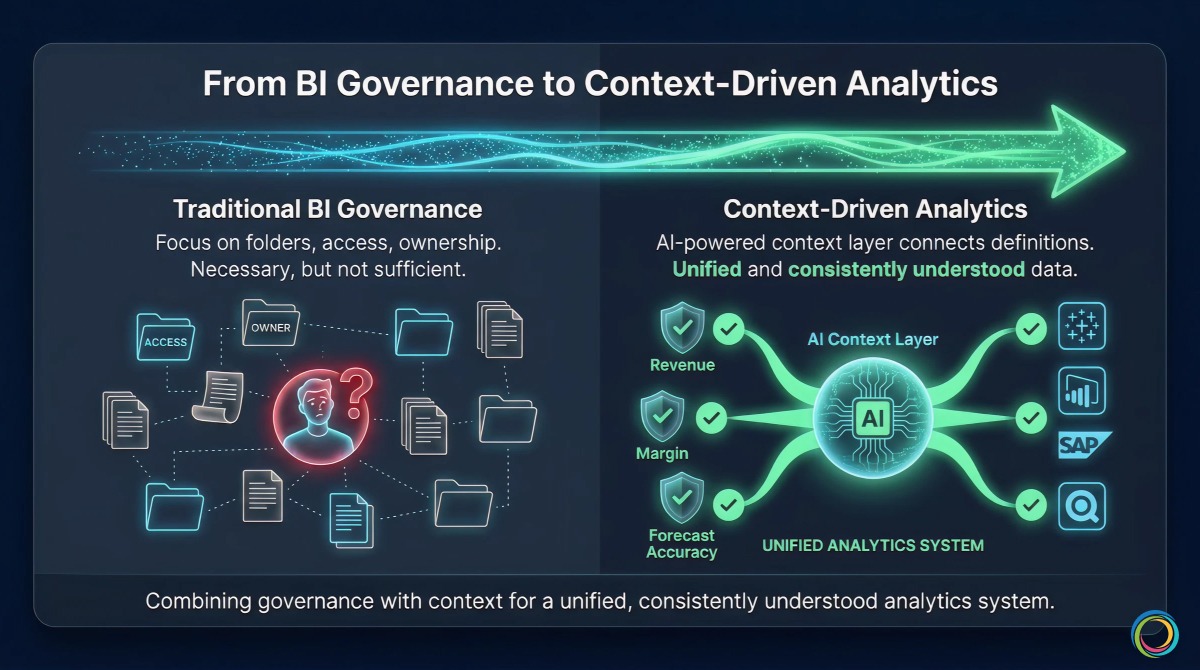
Traditional analytics governance focuses on organizing reports, assigning ownership, and managing access. While this is necessary, it is not sufficient for modern enterprise analytics.
Organizations need a context layer that connects KPI definitions, aligns metrics across teams, and maps relationships between reports, data sources, and business dimensions. This ensures that metrics like revenue, margin, and forecast accuracy mean the same thing across the organization—regardless of whether they are accessed in Tableau, Power BI, SAP Analytics Cloud, or Qlik.
By combining governance with context, enterprises can move from fragmented analytics environments to a unified system where data is not only available, but also consistently understood.
How ZenOptics Supports BI Audits
ZenOptics helps organizations audit and optimize their BI environments by working across existing tools such as Tableau, Power BI, SAP Analytics Cloud, Qlik, MicroStrategy, and spreadsheets. It provides visibility into all analytics assets, capturing metadata, ownership, usage, and lineage.
Beyond cataloging, ZenOptics enables organizations to connect business meaning across metrics and reports. It builds a context layer that aligns KPI definitions, resolves inconsistencies, and creates a unified understanding of analytics across teams.
This approach transforms BI audits from static inventory exercises into dynamic systems that support governance, standardization, and AI readiness.
Why This Matters for AI and Decision Intelligence
As enterprises adopt AI for analytics, forecasting, and decision-making, the importance of context becomes critical. AI systems can process large volumes of data, but they depend on consistent definitions and structured relationships to interpret that data correctly.
Without a context layer, AI systems generate inconsistent or misleading outputs because they rely on fragmented definitions. With a context layer, AI aligns with business logic, produces consistent insights, and supports reliable decision-making.
This is the shift from traditional analytics to decision intelligence, where insights are not only generated but also trusted and actionable.
Real-World Impact
Organizations that implement structured BI audits and context-driven governance see measurable improvements. They reduce report duplication, improve analytics adoption, and enable faster, more consistent decision-making across teams.
These benefits are especially important in large enterprises where analytics is distributed across multiple tools and business units.
Getting Started
If you are planning a BI migration, the first step is not selecting a new tool. It is understanding your current environment. This means identifying all analytics assets, evaluating their usage, and aligning definitions across teams.
A structured BI audit provides this foundation. When combined with a context layer, it ensures that analytics is not only organized but also consistent, scalable, and ready for AI.
Schedule a demo to explore how ZenOptics can support your BI audit and migration strategy.
FAQ
How long does a BI audit take?
Manual audits typically take several weeks depending on the size of the organization and the number of BI tools involved. Automated approaches can significantly reduce this timeline.
Should we audit before selecting a BI platform?
Yes. Audit insights help determine which platform best fits your organization’s needs and prevent unnecessary migration complexity.
What should we do with duplicate reports?
Duplicate reports should be evaluated, consolidated, or removed to reduce confusion and improve efficiency.
Conclusion
A BI migration without an audit is a risk. An audit without context is incomplete.
Enterprises that succeed in modern analytics are those that combine governance with a context layer—ensuring that data is not just available, but consistently understood across tools like Tableau, Power BI, SAP Analytics Cloud, Qlik, MicroStrategy, and spreadsheets.
That is what makes analytics scalable, reliable, and ready for AI.
Further Reading
- Analytics Governance Maturity Model
- Power BI Governance at Enterprise Scale
- Analytics Governance for CPG
Audit Your BI Environment Before It Costs You the Migration
Enterprises migrating without a BI audit typically carry forward 40–60% redundant or unused reports, recreating the same inefficiencies in a new platform. Our team can walk you through a complimentary assessment of your Tableau, Power BI, SAP Analytics Cloud, or multi-platform environment to identify what's worth migrating, what needs consolidation, and what's safe to retire before you move a single asset.
Schedule Your Assessment